Bring in saves from Substack, Medium, YouTube and Instagram
You probably already save things in other places: posts on Substack, your Medium reading list, YouTube's Watch later, saved posts on Instagram. The Chrome clipper can collect those saves and send them to Lazy Reader on a schedule, so they get summaries and land in one feed.
The clipper does this with your own logins in your own Chrome.
Experimental
Each of these syncs is marked Experimental. None of these sites has an official way to do this, so a sync can stop working without notice. Instagram can restrict accounts that use automated tools, and Medium's terms limit browser add-ons. Turn each one on at your own risk.
Before you start
- The Chrome clipper is installed and connected. See Install the Chrome clipper.
- In the same Chrome, you are signed in to each site you want to sync: substack.com, medium.com, youtube.com, instagram.com.
- You have an OpenRouter key in Lazy Reader. Every synced item gets a summary on your key, so a first sync of 100 items is 100 summaries.
- For Instagram only: a SociaVault key, saved in Lazy Reader under Settings, Capture, Instagram. Lazy Reader uses it to read each post, at about one SociaVault credit per post.
Step 1: open the Sync settings
- Click the clipper button in Chrome's toolbar.
- Click the gear at the top right of the clipper window. The clipper's settings open in a tab.
- Click Sync in the list of sections.
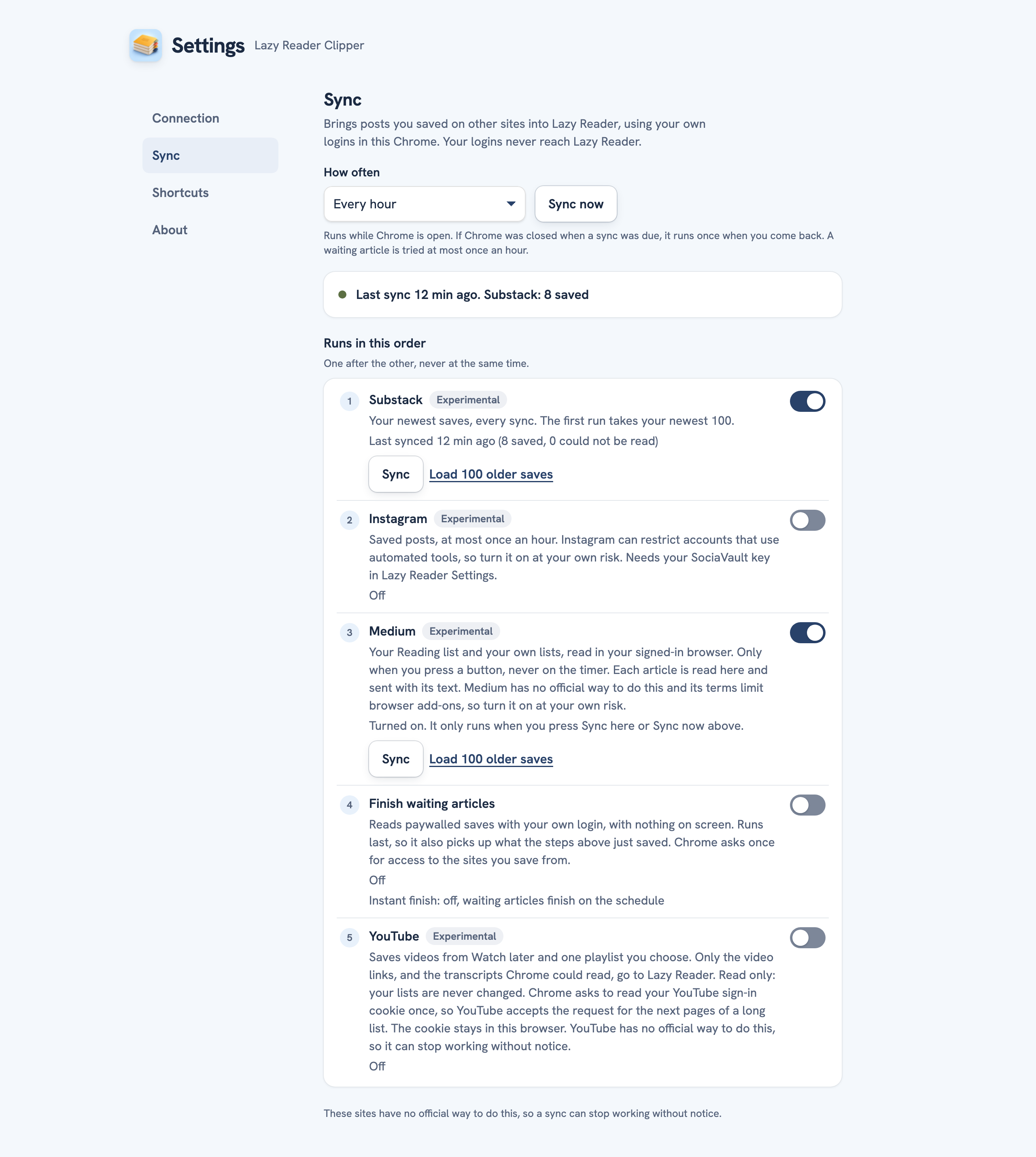
The Sync page starts with "Brings posts you saved on other sites into Lazy Reader, using your own logins in this Chrome. Your logins never reach Lazy Reader." Under Runs in this order you see five rows, each with a switch on the right: Substack, Instagram, Medium, Finish waiting articles and YouTube. All of them are off at first, and each row says "Off".
Step 2: choose how often
At the top, How often sets the timer for every sync at once:
- Every hour (the default)
- Every 3 hours
- Twice a day
- Once a day
- Only when I press Sync now
Syncs only run while Chrome is open. If Chrome was closed when a sync was due, it runs once when you open Chrome again. The services run one after the other, never at the same time.
Step 3: turn a service on
- Click the switch on the service's row.
- Chrome asks to let the clipper read that site. Click Allow. If you say no, the switch goes back off and the row says the sync needs access to the site.
- For some services the clipper then asks one more question about cost. Read it and click OK to go ahead, or Cancel to leave it off.
The row now says "Turned on. Runs with the next sync, or press Sync." and shows two new buttons: Sync and Load 100 older saves.
Step 4: run the first sync
Click Sync on the service's row to run just that one, or Sync now at the top to run every service that is on. The row says "Syncing..." while it works.
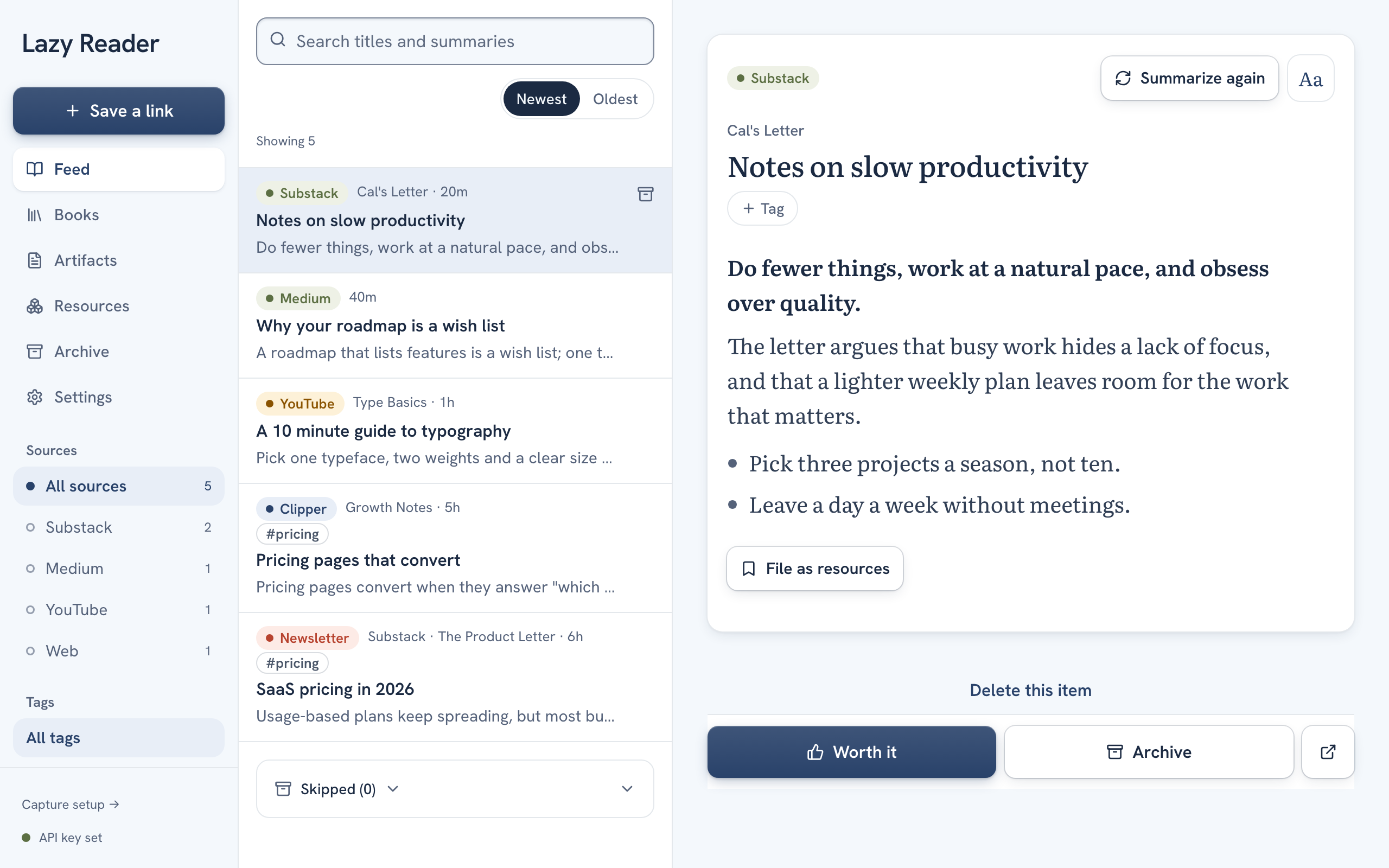
When it is done the row says, for example, "Last synced just now", with a short result in brackets. Open Lazy Reader: the new items are in your Feed, each with the site's label (Substack, Medium, YouTube or Instagram) and, a minute later, its summary.
Step 5: go further back
Each sync takes your newest saves. To bring in older ones, click Load 100 older saves on the row (Load 100 older videos for YouTube). Each click fetches the next 100. Medium and Instagram ask about cost first.
What each service does
| Service | What it brings in | Notes |
|---|---|---|
| Substack | Your newest saves, every sync. The first run takes your newest 100. | Read in your browser and sent with the text. |
| Your saved posts, at most once an hour. | Needs your SociaVault key in Lazy Reader. The first sync can be up to 100 posts, so it asks before it starts. Without the key the posts wait in Lazy Reader. | |
| Medium | Your Reading list and your own lists. | Only when you press Sync or Sync now, never on the timer. Each article is read in your browser and sent with its text. It warns that up to 100 articles each get a summary on your key. |
| YouTube | Watch later and one playlist you choose. | Only the video links and the transcripts Chrome could read are sent. Your lists are never changed. |
YouTube's extra settings
When YouTube is on, three more settings appear under its row:
- Watch later: a switch. The first run takes the newest 100 you added.
- One playlist (link or id): paste a playlist link and click Check and save playlist. The clipper says "Reading the playlist" and its name when it found it.
- Include Shorts: off by default. The status line counts the Shorts it left out.
Chrome also asks once to read your YouTube sign-in cookie. The cookie stays in your browser. Until you pick Watch later or a playlist, the row says "Turned on. Choose Watch later or a playlist below."
Finish waiting articles
The fourth row is not a site. It reads paywalled saves that are waiting in Lazy Reader, with your own login, and runs last so it also picks up what the other rows just saved. See Finish waiting saves.
When a row says something else
| Row says | What to do |
|---|---|
| "Sign in to Medium in this browser, then press Sync." (or another site) | Open the site in this Chrome, sign in, then press Sync. |
| "Last sync failed:" and a reason | Wait for the next run, or press Sync to try again. |
| "A sync is already running." | Wait for it to end. |
| "Nothing is switched on to sync." | Turn on at least one switch first. |
Related pages: Save with the Chrome clipper, Ways to save, What it costs and where your data goes.