The feed
The feed is the list of links you saved and have not cleared yet. Think of it as an inbox: things come in, you read their summaries, and you clear them.
What lands in the feed
Every link you save goes to the feed, whichever way you saved it: the Save a link box, the iPhone share sheet, the Chrome clipper, a forwarded newsletter or Claude. Books, artifacts and resources do not. They have their own tabs.
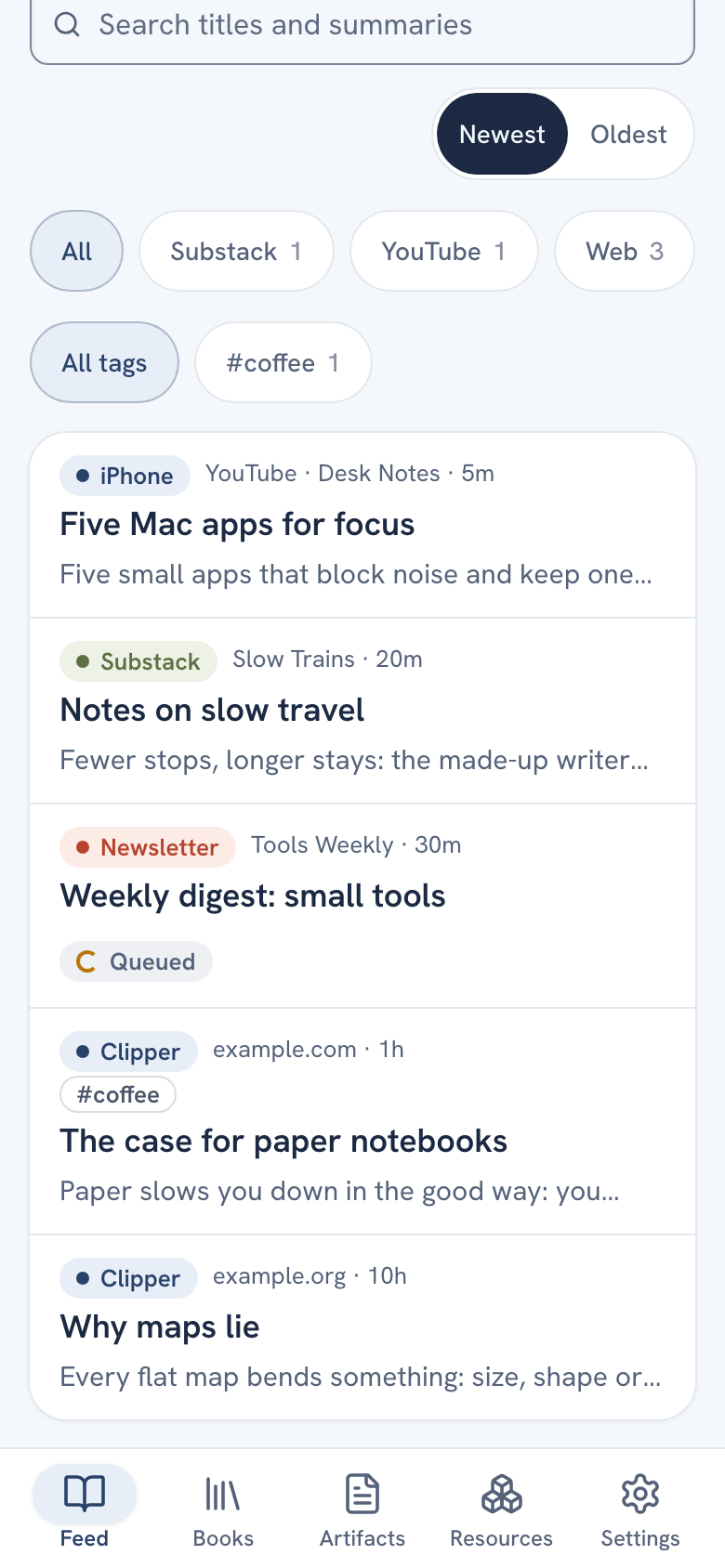
The newest save is at the top. Press Oldest above the list to turn it around; this browser remembers your pick. The feed shows 50 rows at a time. Press Older at the bottom for the next 50. New saves appear on their own, without a reload. On a phone you can also pull the list down to refresh it.
What a row shows
- The origin chip: where the save came from, such as iPhone, Clipper, Newsletter, Substack or Claude.
- The site, how long ago it was saved, and up to three of your tags.
- The title and a line from the summary.
- A label, only when something needs your attention. A finished save has none.
| Label | What it means |
|---|---|
| Queued | The summary is being written. It takes about a minute. |
| Stuck | Still queued after five minutes. Open it and press Try again. |
| Needs a key | There is no OpenRouter key in Settings yet. |
| Waiting for full text | The page is behind a paywall or login. The Chrome clipper finishes it. |
| Waiting for transcript | A YouTube video the server could not read. The iPhone app fills it in. |
| Members only, Couldn't open, Failed | The save could not be read or summarized. Open it to see why. |
The full list is in Item status labels.
Finding something
The search field, "Search titles and summaries", sits above the list. You can also narrow the feed by source and by tag: with the Sources and Tags lists in the sidebar on a computer, or the chips under the search field on a phone. See Search, sort and filter the feed.
How items leave
An item leaves the feed in one of three ways:
- Worth it: out of the feed, remembered as worth your time.
- Archive: out of the feed, nothing more.
- Delete: gone for good, after a question. There is no undo.
Both Worth it and Archive keep the item on the Archive page, where Unarchive brings it back. See Worth it and Archive.
On a phone you can clear a row without opening it. Swipe it right for Worth it. Swipe it left to show three buttons: File (look for resources in it), Archive and Delete. A long swipe left archives at once. On a computer each row has an Archive button, and in a wide window the e key archives the open item.