
Books and reading guides
A book you own can go into Lazy Reader too. You give it an EPUB or a text PDF, and you get back a reading guide: a summary of every chapter and a plan that tells you which chapters to read in full, which to know from their summary and which to skip, measured against why you are reading the book.
Your file stays with you
When you add a book, Lazy Reader reads the file on your own device. The file itself is never uploaded. Only the text is sent. It stays private to you and goes to your model, with your key, to write the guide. Only add books you own.
Lazy Reader reads EPUB files and PDFs that contain text, up to 100 MB. It cannot read copy-protected (DRM) books, scanned PDFs or MOBI files. A book must have between 1,000 and 300,000 words.
What a guide holds
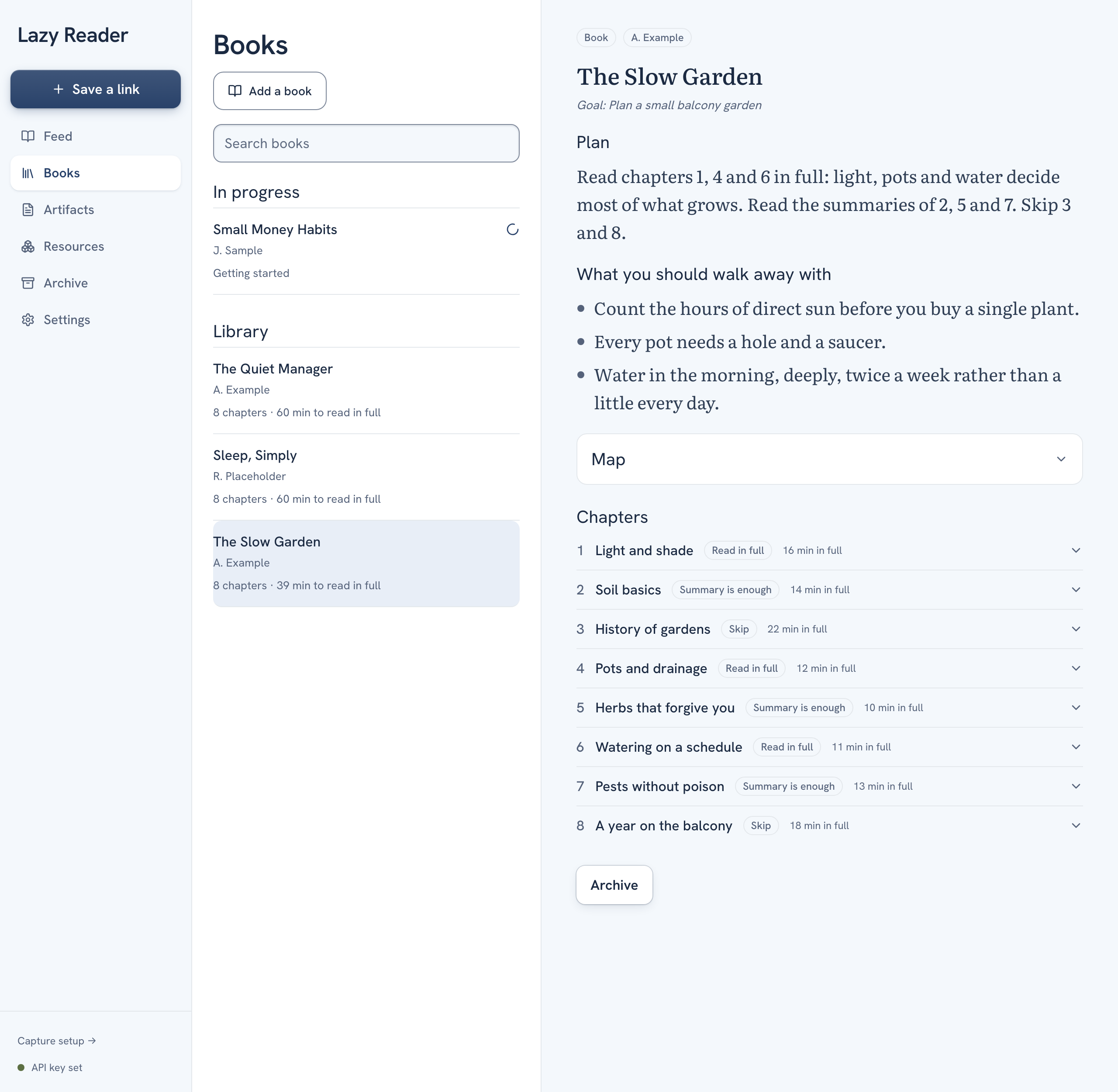
| Part | What it is |
|---|---|
| Plan | How to read this book for your goal, in minutes. |
| What you should walk away with | The few points the book should leave you with. |
| Map | A table of every chapter with its tier, why, and minutes to read in full. It starts closed. |
| Exercises | The book's exercises, each with a verdict against your goal. Every one is optional. |
| Book notes | Tools, people and books the author cites that are worth knowing. |
| Chapters | The chapter list. Click a chapter to open its summary. |
Chapter tiers
Each chapter gets one of three tiers:
- Read in full: worth your time for what you want from the book.
- Summary is enough: the summary gives you what you need.
- Skip: not useful for your goal.
The tiers depend on your answer to "Why are you reading this? (optional)" when you add the book. Leave it empty and Lazy Reader uses what you wrote under What I care about in Settings.
Where books live
Books have their own tab. Add a book is at the top. In progress lists books being summarized, with a line such as "7 of 20 chapters". Library lists finished books with their chapter count and the minutes it takes to read the chapters marked Read in full.
A book takes a while: at least one model call per chapter (a long chapter is split into parts, one call each, then one to join them), then one for the whole guide. You can close the app while it works. Before you start, the add-a-book page shows an estimate of the cost on your OpenRouter key and the time.
If a book stops halfway, it says "This book stopped" with Retry. You can also use Write a guide from what is done.
Change how guides are written
Under Settings, Reading taste are two styles of their own: Book chapter style for each chapter summary and Book guide style for the plan, map, exercises and book notes. See Shape your summaries.
See Add a book and Read a book guide for the steps.