
Shape your summaries
Lazy Reader writes every summary with a set of standard rules: the main point first, then the points that hold it up, with numbers and names kept exactly. Those rules work for most people. If you want summaries that read differently, you can tell the model about yourself and write your own rules.
Everything on this page is in Settings, Reading taste. It has four parts:
| Part | What it changes |
|---|---|
| What I care about | A few lines about you and your interests, given to the model with every article and book. |
| Summary style | How the summary of a saved link is written. |
| Book chapter style | How each chapter of a book summary is written. |
| Book guide style | How the whole-book guide is written: plan, map, exercises and book notes. |
Open Reading taste
- On a computer, click Settings in the left sidebar. In the list of groups on the left of the Settings page, click Reading taste.
- On a phone, tap the Settings tab at the bottom of the screen, then tap Reading taste.
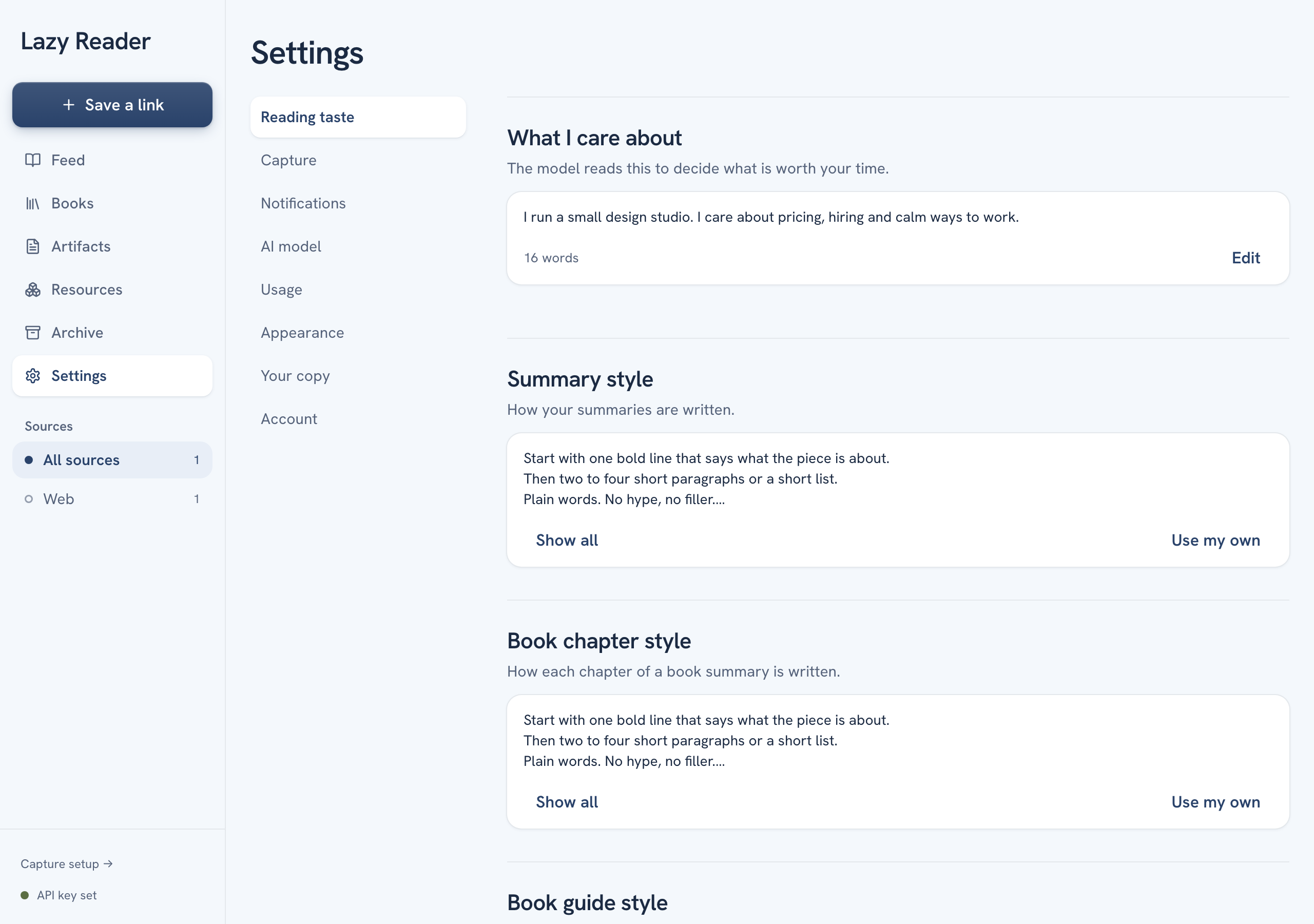
Tell the model what you care about
- Under What I care about, click Edit.
- A text box opens. Write a few plain sentences about you: what you work on, what you want to learn, what you do not need explained. The box shows an example to start from.
- Click Save. To leave without changing anything, click Cancel.
Under the box you read "Nothing is saved until you press Save." If you leave the page before you save, your draft is kept. The next time you click Edit, it says "Draft restored."
When it is saved, the card shows the first lines of your text and how many words it has.
INFO
Every link you save is summarized in full, whatever you write here. This text gives the model context about you. It does not hide or drop anything.
Your interests are also used for books. When you add a book and leave Why are you reading this? empty, the guide is written against your interests. See Add a book.
Write your own summary style
- Under Summary style, read the card. It shows the start of the standard rules. Click Show all to read every rule, and Show less to fold them again.
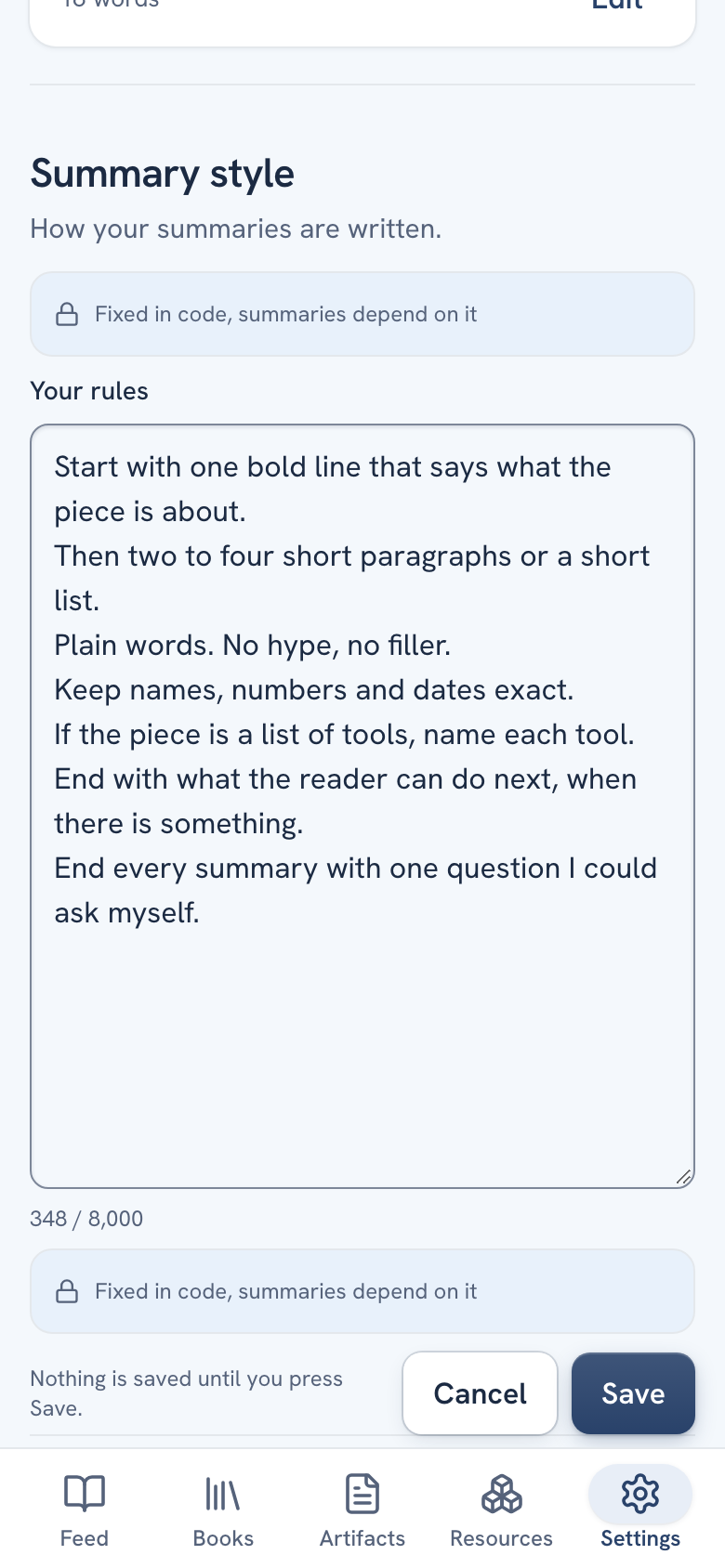
- Click Use my own. An editor opens with four parts:
- Fixed start, folded. This is the part that tells the model what it is reading. It says "Fixed in code, summaries depend on it". You can open it to read it, but not change it.
- Your rules: a text box filled with a copy of the standard rules. This is the part you change.
- A count of characters, up to 8,000.
- Fixed end, folded. A last line that keeps the answer in the shape Lazy Reader can read. You cannot change it either.
- Change the rules. Keep them short and concrete. For example, add a line such as "End every summary with one question I could ask myself."
- Click Save. To leave without saving, click Cancel.
After you save, the card says Your own style above your rules. From then on it shows Edit and Back to standard.
New summaries use your rules. To redo a summary you already have, open the item and click Summarize again. See Read a summary.
TIP
Change one thing at a time. Save, then use Summarize again on an article you know well and compare. If the result is worse, go back to the standard style.
Go back to the standard style
- Under the style, click Back to standard.
- A message says "Back to the standard style", with an Undo button.
- Click Undo in that message if you pressed it by mistake. Your own rules come back.
When the standard rules change
Lazy Reader improves its standard rules from time to time. If you use your own style, nothing changes for you by surprise. The card shows a box instead:
- "The standard prompt changed."
- "Your own style stays in use until you decide."
You then have three buttons:
| Button | What it does |
|---|---|
| Show changes | Shows what changed in the standard rules. Click Hide changes to close it. |
| Keep mine | Keeps your rules and hides the box. |
| Back to standard | Drops your rules and uses the new standard ones. |
Book chapter style and Book guide style
These two work exactly like Summary style, with their own Use my own, Your chapter rules or Your guide rules, Save and Back to standard.
- Book chapter style changes how each chapter summary reads.
- Book guide style changes the guide on top of the book: the plan, the map, the exercises and the book notes.
They apply to your own books only, from the next book or chapter summarized after you save. See Read a book guide.
Related pages: Summaries, Every setting.